Building Retro Snake with Claude AI
How I rebuilt Nokia 3310's Snake II from scratch in C99, pixel-perfect LCD simulation, Raylib GUI, a custom PRNG, and 141 tests, entirely through pair-programming with Claude.
Construyendo Retro Snake con Claude AI
Cómo reconstruí el Snake II de Nokia 3310 desde cero en C99: simulación LCD píxel a píxel, GUI con Raylib, un PRNG propio y 141 tests, todo a través de pair-programming con Claude.
The Idea
Nokia 3310 Snake II is one of the most iconic mobile games ever made. I wanted to rebuild it, not just a game that feels similar, but a faithful recreation: the exact 84×48 monochrome LCD, the 4×4 pixel sprites, the green backlight, the scrolling menus. Every detail.
The constraint I set for myself: build it entirely through conversation with Claude AI. No copy-pasting from Stack Overflow, no looking up tutorials, just me, Claude, and a C compiler.
The result runs as a native macOS GUI window (Raylib) and also in the terminal via Unicode block characters. The GUI version is fully polished and available as a pre-built binary for macOS Apple Silicon; the terminal port is still a work in progress.
Architecture
The first decision Claude pushed me on was separation of concerns. The game logic should know nothing about how it’s rendered or where input comes from. That led to a clean split:
src/
  core/          Zero platform dependencies
    game.h/c     Game state, collisions, scoring, bonus system
    snake.h/c    Snake data structure and movement
    lcd.h/c      84×48 1-bit framebuffer
    renderer.h/c Game frame, menus, pause screen
    ui.h/c       UI state machine
    theme.h/c    Color palettes

  platform.h     Interface every port must implement
  ports/
    pc-gui/      Raylib — pixel grid + audio
    pc/          Terminal — ANSI + Unicode (WIP)
Every port implements 8 functions from platform.h: init, shutdown, present framebuffer, get input, get time, play sound, set volume, and sleep. That’s it. The entire game loop, menu system, and rendering logic live in core/ and never touch platform-specific code.
Adding a new target (SDL, web via Emscripten, an embedded display) means writing those 8 functions. Nothing else changes.
The shared types that wire everything together are tiny:
typedef struct {
    int16_t x;
    int16_t y;
} Point_t;

typedef enum {
    DIR_UP, DIR_DOWN, DIR_LEFT, DIR_RIGHT
} Direction_t;

typedef struct {
    uint16_t board_width;
    uint16_t board_height;
    uint16_t initial_length;
    uint16_t tick_ms;
} GameConfig_t;
The Game Loop
The game loop runs at 60fps for smooth rendering, but the game logic ticks at a configurable interval (150ms by default). These two rates are decoupled using a time accumulator:
double last_time = platform_get_time();
double tick_acc  = 0.0;

while (ui.state != APP_QUIT && !platform_should_close()) {
    UiInput_t input  = platform_get_input();
    UiResult_t result = ui_handle_input(&ui, input);

    if (result.sound != SND_COUNT)
        platform_play_sound(result.sound);

    if (ui.state == APP_PLAYING) {
        InputEvent_t gi = ui_input_to_game(input);
        if (gi != INPUT_NONE)
            game_handle_input(&game, gi);

        double now = platform_get_time();
        tick_acc  += now - last_time;
        last_time  = now;

        double tick_s = config.tick_ms / 1000.0;
        if (tick_acc >= tick_s) {
            game_update(&game);
            tick_acc -= tick_s;
        }
    }

    /* render + platform_present() */
    platform_sleep_ms(16);
}
The key insight: tick_acc accumulates real elapsed time every frame. When it exceeds one game tick, game_update() fires and the accumulator is reduced by exactly one tick, not reset to zero. This keeps the game speed consistent regardless of frame rate, and avoids drift over time.
The Snake
I originally described the snake as a linked list. It’s not. Claude corrected me during one of our early sessions. An array is better here.
The snake is stored as a fixed-size array of Point_t coordinates, up to 256 segments:
typedef struct {
    Point_t    body[SNAKE_MAX_LENGTH]; /* body[0] = head */
    bool       fat[SNAKE_MAX_LENGTH];  /* segment has food bulge */
    uint16_t   length;
    Direction_t direction;
    Direction_t dir_buf[2];            /* buffered direction inputs */
    uint8_t    dir_buf_len;
    uint8_t    grow_pending;
} Snake_t;
Each tick, movement is a shift: every segment copies its predecessor’s position, then the head moves one step in the current direction.
void snake_move(Snake_t *snake)
{
    /* Apply one buffered direction per tick */
    if (snake->dir_buf_len > 0) {
        snake->direction = snake->dir_buf[0];
        snake->dir_buf[0] = snake->dir_buf[1];
        snake->dir_buf_len--;
    }

    /* Extend length before shifting so the tail stays in place */
    if (snake->grow_pending > 0 && snake->length < SNAKE_MAX_LENGTH) {
        snake->length++;
        snake->grow_pending--;
    }

    /* Shift body and fat flags */
    for (uint16_t i = snake->length - 1; i > 0; i--) {
        snake->body[i] = snake->body[i - 1];
        snake->fat[i]  = snake->fat[i - 1];
    }
    snake->fat[0] = false;

    /* Move head */
    switch (snake->direction) {
    case DIR_UP:    snake->body[0].y--; break;
    case DIR_DOWN:  snake->body[0].y++; break;
    case DIR_LEFT:  snake->body[0].x--; break;
    case DIR_RIGHT: snake->body[0].x++; break;
    }
}
A linked list would require a pointer traversal for collision detection and random access, slower and less cache-friendly. With an array, all 256 segments live in contiguous memory.
Two other details worth noting:
Direction buffering. The game accepts up to 2 queued direction changes per tick. Press right then down in quick succession and both register, instead of the second input getting dropped because the first hasn’t been processed yet. It also blocks reversals, you can’t turn 180° by pressing the opposite direction.
Wrap-around. The walls aren’t fatal. When the snake hits a border, it exits the other side. This matches the original Nokia behavior.
Food, Bonus & Scoring
Normal food adds 7 points and grows the snake by one segment. Every 5 foods, a bonus item spawns, 2 cells wide, and stays on the board for 20 ticks before disappearing. Eating it scores 77 points.
void game_update(Game_t *game)
{
    snake_move(&game->snake);
    Point_t head = snake_head(&game->snake);

    /* Wrap around walls */
    if (head.x < 0) head.x = game->config.board_width - 1;
    else if (head.x >= game->config.board_width) head.x = 0;
    if (head.y < 0) head.y = game->config.board_height - 1;
    else if (head.y >= game->config.board_height) head.y = 0;
    game->snake.body[0] = head;

    if (snake_collides_self(&game->snake)) {
        game->status = STATE_GAME_OVER;
        return;
    }

    /* Bonus countdown */
    if (game->bonus_active && --game->bonus_steps == 0)
        game->bonus_active = false;

    /* Bonus consumption (2 cells wide) */
    if (game->bonus_active &&
        head.y == game->bonus.y &&
        (head.x == game->bonus.x || head.x == game->bonus.x + 1)) {
        game->snake.fat[0] = true;
        snake_grow(&game->snake);
        game->score += 77;
        game->bonus_active = false;
    }

    /* Food consumption */
    if (head.x == game->food.x && head.y == game->food.y) {
        game->snake.fat[0] = true;
        snake_grow(&game->snake);
        game->score += 7;
        game->food_count++;
        game_spawn_food(game);

        if (game->food_count % 5 == 0 && !game->bonus_active)
            game_spawn_bonus(game);
    }
}
The fat[0] = true flag on the head segment creates a visual bulge effect in the renderer, which renders that cell slightly larger to mimic the original game’s animation when food is swallowed.
Food and bonus spawn positions are generated by a custom xorshift32 PRNG, no stdlib dependency, no platform randomness, fully deterministic given a seed:
static uint32_t rng_next(uint32_t *state)
{
    uint32_t x = *state;
    x ^= x << 13;
    x ^= x >> 17;
    x ^= x << 5;
    *state = x;
    return x;
}
LCD Framebuffer & Raylib Rendering
The game doesn’t render to a window directly. It renders to an 84×48 1-bit framebuffer that simulates the Nokia LCD. Every module draws into this buffer; platform_present() decides how to display it.
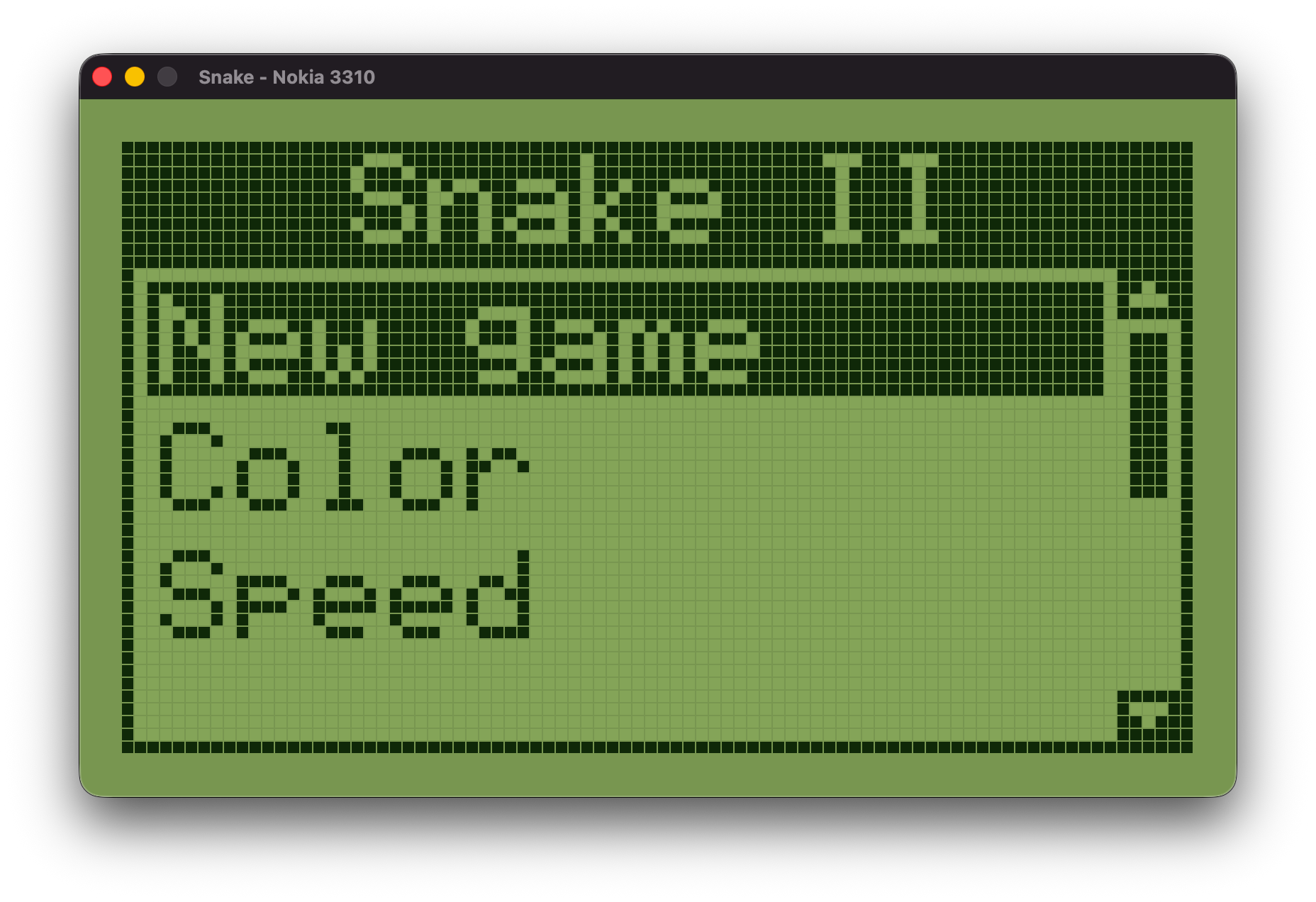
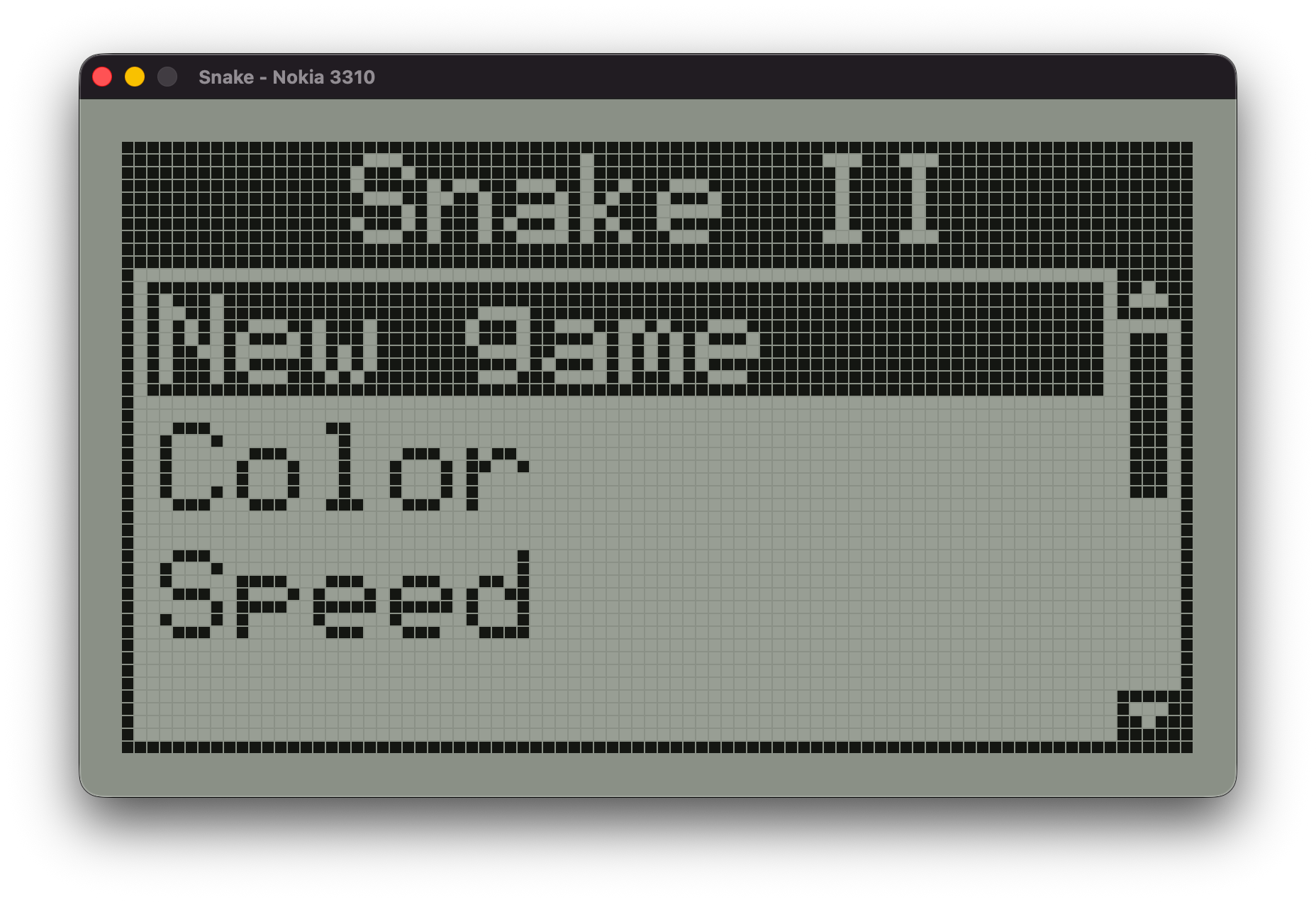
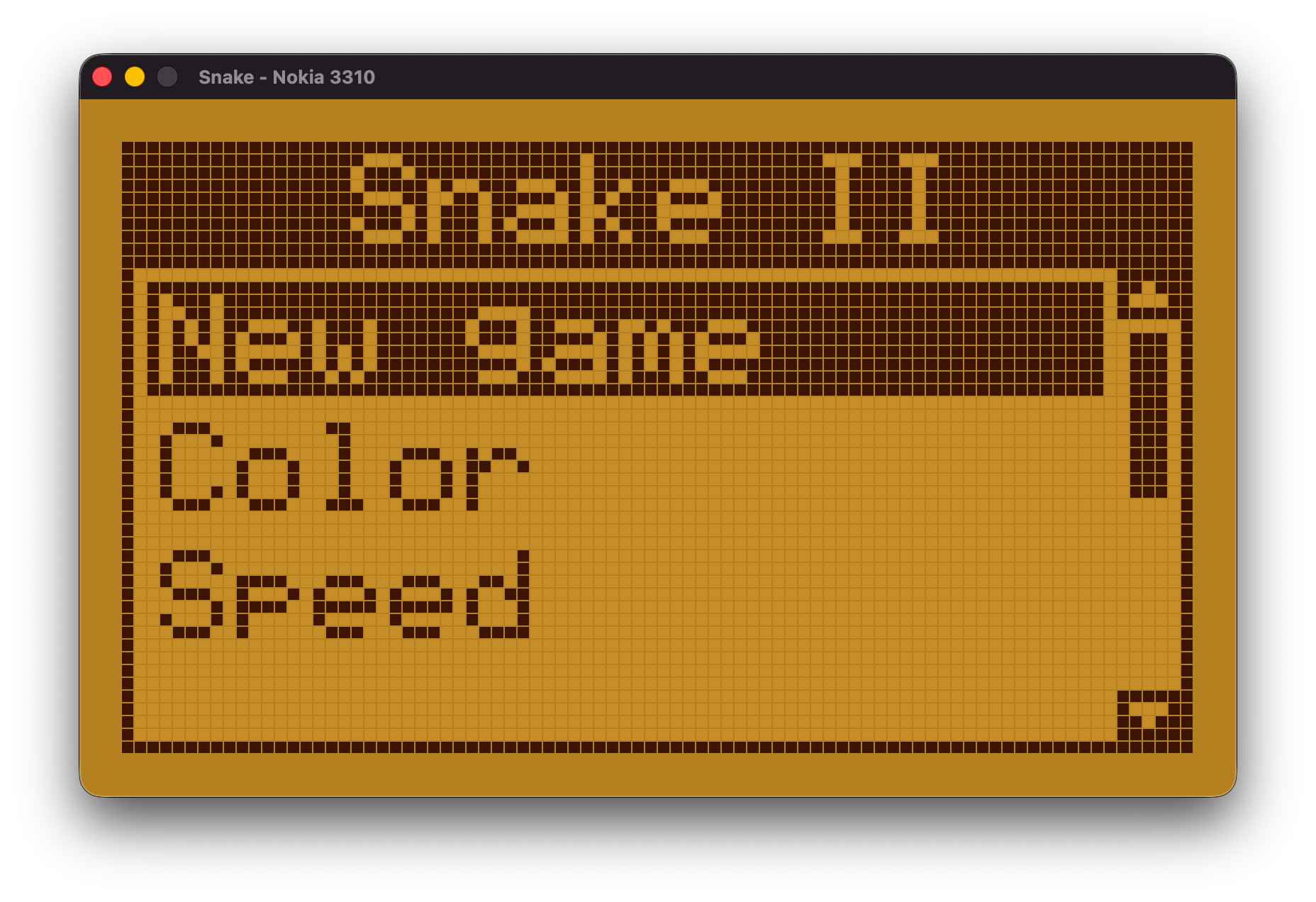
In the Raylib port, each LCD pixel becomes an 8×8 square with a 1-pixel gap. That gap is what creates the visible grid that makes it look like a real LCD screen:
#define PIXEL_SCALE  8
#define PIXEL_GAP    1
#define PIXEL_CELL   (PIXEL_SCALE + PIXEL_GAP)  /* 9px per LCD pixel */
#define BEZEL        30

void platform_present(const uint8_t (*fb)[LCD_WIDTH],
                      const LcdPalette_t *palette)
{
    Color gap = to_raylib(palette->gap);
    Color on  = to_raylib(palette->pixel_on);
    Color off = to_raylib(palette->pixel_off);

    BeginDrawing();
    ClearBackground(gap);

    /* Fill LCD area — gap color becomes the grid lines */
    DrawRectangle(lcd_ox, lcd_oy,
                  LCD_WIDTH * PIXEL_CELL, LCD_HEIGHT * PIXEL_CELL, gap);

    /* Draw each pixel as an 8×8 square */
    for (int y = 0; y < LCD_HEIGHT; y++) {
        for (int x = 0; x < LCD_WIDTH; x++) {
            int sx = lcd_ox + x * PIXEL_CELL;
            int sy = lcd_oy + y * PIXEL_CELL;
            DrawRectangle(sx, sy, PIXEL_SCALE, PIXEL_SCALE,
                          fb[y][x] ? on : off);
        }
    }

    EndDrawing();
}
Three color palettes ship with the game:
Terminal Port (Work in Progress)
The terminal port renders the same 84×48 framebuffer using Unicode’s upper-half-block character (▀). Since ▀ fills only the top half of a character cell, each terminal row can represent two LCD pixel rows, one as the foreground color and one as the background color:
/* ▀ in UTF-8: 0xE2 0x96 0x80 */
/* fg = top pixel color, bg = bottom pixel color */
render_buf[pos++] = '\xe2';
render_buf[pos++] = '\x96';
render_buf[pos++] = '\x80';
The port supports both 256-color ANSI and true 24-bit color (opt-in via the COLORTERM environment variable). The game and menus look identical to the GUI version.
That said, the terminal port isn’t finished. Input handling has some rough edges around raw mode and non-blocking I/O on different terminal emulators, and the timing model needs more work. It’s functional enough to play, but I wouldn’t call it polished yet.
What I Learned
The linked list conversation. When I described the snake as a linked list, Claude stopped me and asked what operations I’d need on it: iteration for rendering, index access for collision, append for growth, and head insertion for movement. An array with shifting handles all of those better: contiguous memory, cache-friendly, no pointer chasing. It was a 2-minute conversation that changed the core data structure.
Zero malloc. The entire game uses zero heap allocation. Everything lives on the stack in fixed-size arrays: Snake_t has body[256], the LCD framebuffer is a static uint8_t[48][84]. Claude pushed for this early. No allocation means no fragmentation, no failure paths from OOM, and simpler reasoning about memory.
141 tests. The test suite covers game logic, LCD operations, sprite rendering, the renderer, and the UI state machine. Having Claude write tests alongside the implementation meant bugs were caught immediately rather than discovered during play.
AI as a thought partner. The most useful thing Claude did wasn’t write code, it was ask questions. Why a linked list? What happens when the snake fills the board? What if two inputs arrive in the same tick? Those questions shaped the design more than any specific code suggestion.
Try It
Pre-built binaries are available for macOS Apple Silicon (M1/M2/M3/M4), no dependencies needed.
To build from source:
brew install raylib
git clone https://github.com/matias-krabzik/retro-game-snake
make -C retro-game-snake/src/ports/pc-gui
./retro-game-snake/src/ports/pc-gui/snake-gui
Source and downloads at github.com/matias-krabzik/retro-game-snake.
La Idea
Snake II de Nokia 3310 es uno de los juegos móviles más icónicos de la historia. Quería reconstruirlo, no solo un juego que se sienta parecido, sino una recreación fiel: la LCD monocromática exacta de 84×48, los sprites de 4×4 píxeles, la retroiluminación verde, los menús con scroll. Cada detalle.
La restricción que me impuse: construirlo enteramente a través de conversaciones con Claude AI. Sin copy-paste de Stack Overflow, sin tutoriales, solo yo, Claude, y un compilador de C.
El resultado corre como ventana GUI nativa de macOS (Raylib) y también en la terminal mediante caracteres Unicode. La versión GUI está completamente pulida y disponible como binario pre-compilado para macOS Apple Silicon; el port de terminal todavía es un trabajo en progreso.
Arquitectura
La primera decisión en la que Claude me insistió fue la separación de responsabilidades. La lógica del juego no debería saber nada sobre cómo se renderiza ni de dónde viene el input. Eso llevó a una división limpia:
src/
  core/          Sin dependencias de plataforma
    game.h/c     Estado del juego, colisiones, puntaje, sistema de bonus
    snake.h/c    Estructura de datos y movimiento de la serpiente
    lcd.h/c      Framebuffer 1-bit de 84×48
    renderer.h/c Frame del juego, menús, pantalla de pausa
    ui.h/c       Máquina de estados de UI
    theme.h/c    Paletas de colores

  platform.h     Interfaz que debe implementar cada port
  ports/
    pc-gui/      Raylib — grilla de píxeles + audio
    pc/          Terminal — ANSI + Unicode (WIP)
Cada port implementa 8 funciones de platform.h: init, shutdown, presentar framebuffer, obtener input, obtener tiempo, reproducir sonido, ajustar volumen, y sleep. Eso es todo. El loop del juego completo, el sistema de menús, y la lógica de renderizado viven en core/ y nunca tocan código específico de plataforma.
Agregar un nuevo target (SDL, web via Emscripten, una pantalla embebida) significa escribir esas 8 funciones. Nada más cambia.
Los tipos compartidos que conectan todo son mínimos:
typedef struct {
    int16_t x;
    int16_t y;
} Point_t;

typedef enum {
    DIR_UP, DIR_DOWN, DIR_LEFT, DIR_RIGHT
} Direction_t;

typedef struct {
    uint16_t board_width;
    uint16_t board_height;
    uint16_t initial_length;
    uint16_t tick_ms;
} GameConfig_t;
El Game Loop
El game loop corre a 60fps para renderizado suave, pero la lógica del juego hace tick a un intervalo configurable (150ms por defecto). Estas dos velocidades están desacopladas usando un acumulador de tiempo:
double last_time = platform_get_time();
double tick_acc  = 0.0;

while (ui.state != APP_QUIT && !platform_should_close()) {
    UiInput_t input  = platform_get_input();
    UiResult_t result = ui_handle_input(&ui, input);

    if (result.sound != SND_COUNT)
        platform_play_sound(result.sound);

    if (ui.state == APP_PLAYING) {
        InputEvent_t gi = ui_input_to_game(input);
        if (gi != INPUT_NONE)
            game_handle_input(&game, gi);

        double now = platform_get_time();
        tick_acc  += now - last_time;
        last_time  = now;

        double tick_s = config.tick_ms / 1000.0;
        if (tick_acc >= tick_s) {
            game_update(&game);
            tick_acc -= tick_s;
        }
    }

    /* render + platform_present() */
    platform_sleep_ms(16);
}
La clave: tick_acc acumula el tiempo real transcurrido en cada frame. Cuando supera un tick del juego, game_update() se ejecuta y el acumulador se reduce exactamente un tick, no se resetea a cero. Esto mantiene la velocidad del juego consistente independientemente del frame rate, y evita drift con el tiempo.
La Serpiente
Originalmente describí la serpiente como una lista enlazada. No lo es. Claude me corrigió durante una de nuestras sesiones tempranas. Un array es mejor acá.
La serpiente se almacena como un array de tamaño fijo de coordenadas Point_t, con hasta 256 segmentos:
typedef struct {
    Point_t    body[SNAKE_MAX_LENGTH]; /* body[0] = cabeza */
    bool       fat[SNAKE_MAX_LENGTH];  /* segmento tiene bulge de comida */
    uint16_t   length;
    Direction_t direction;
    Direction_t dir_buf[2];            /* direcciones buffereadas */
    uint8_t    dir_buf_len;
    uint8_t    grow_pending;
} Snake_t;
En cada tick, el movimiento es un shift: cada segmento copia la posición de su predecesor, luego la cabeza se mueve un paso en la dirección actual.
void snake_move(Snake_t *snake)
{
    /* Aplicar una dirección buffereada por tick */
    if (snake->dir_buf_len > 0) {
        snake->direction = snake->dir_buf[0];
        snake->dir_buf[0] = snake->dir_buf[1];
        snake->dir_buf_len--;
    }

    /* Extender longitud antes del shift para que la cola quede en su lugar */
    if (snake->grow_pending > 0 && snake->length < SNAKE_MAX_LENGTH) {
        snake->length++;
        snake->grow_pending--;
    }

    /* Shift del cuerpo y flags fat */
    for (uint16_t i = snake->length - 1; i > 0; i--) {
        snake->body[i] = snake->body[i - 1];
        snake->fat[i]  = snake->fat[i - 1];
    }
    snake->fat[0] = false;

    /* Mover cabeza */
    switch (snake->direction) {
    case DIR_UP:    snake->body[0].y--; break;
    case DIR_DOWN:  snake->body[0].y++; break;
    case DIR_LEFT:  snake->body[0].x--; break;
    case DIR_RIGHT: snake->body[0].x++; break;
    }
}
Una lista enlazada requeriría traversal de punteros para detección de colisiones y acceso aleatorio, más lento y menos eficiente en caché. Con un array, los 256 segmentos viven en memoria contigua.
Dos detalles más que vale la pena mencionar:
Direction buffering. El juego acepta hasta 2 cambios de dirección en cola por tick. Presionar derecha y luego abajo en rápida sucesión y ambos se registran, en lugar de que el segundo input se pierda porque el primero no fue procesado todavía. También bloquea las reversiones, no podés girar 180° presionando la dirección opuesta.
Wrap-around. Las paredes no son fatales. Cuando la serpiente toca un borde, sale por el otro lado. Esto coincide con el comportamiento original de Nokia.
Comida, Bonus y Puntaje
La comida normal agrega 7 puntos y hace crecer la serpiente un segmento. Cada 5 comidas aparece un item de bonus de 2 celdas de ancho que permanece en el tablero 20 ticks antes de desaparecer. Comerlo otorga 77 puntos.
void game_update(Game_t *game)
{
    snake_move(&game->snake);
    Point_t head = snake_head(&game->snake);

    /* Wrap around en las paredes */
    if (head.x < 0) head.x = game->config.board_width - 1;
    else if (head.x >= game->config.board_width) head.x = 0;
    if (head.y < 0) head.y = game->config.board_height - 1;
    else if (head.y >= game->config.board_height) head.y = 0;
    game->snake.body[0] = head;

    if (snake_collides_self(&game->snake)) {
        game->status = STATE_GAME_OVER;
        return;
    }

    /* Countdown del bonus */
    if (game->bonus_active && --game->bonus_steps == 0)
        game->bonus_active = false;

    /* Consumo del bonus (2 celdas de ancho) */
    if (game->bonus_active &&
        head.y == game->bonus.y &&
        (head.x == game->bonus.x || head.x == game->bonus.x + 1)) {
        game->snake.fat[0] = true;
        snake_grow(&game->snake);
        game->score += 77;
        game->bonus_active = false;
    }

    /* Consumo de comida */
    if (head.x == game->food.x && head.y == game->food.y) {
        game->snake.fat[0] = true;
        snake_grow(&game->snake);
        game->score += 7;
        game->food_count++;
        game_spawn_food(game);

        if (game->food_count % 5 == 0 && !game->bonus_active)
            game_spawn_bonus(game);
    }
}
El flag fat[0] = true en el segmento cabeza crea un efecto visual de bulge en el renderer, que renderiza esa celda un poco más grande para imitar la animación del juego original cuando se traga la comida.
Las posiciones de comida y bonus se generan con un PRNG xorshift32 propio, sin dependencia de stdlib, sin aleatoriedad de plataforma, completamente determinístico dado un seed:
static uint32_t rng_next(uint32_t *state)
{
    uint32_t x = *state;
    x ^= x << 13;
    x ^= x >> 17;
    x ^= x << 5;
    *state = x;
    return x;
}
Framebuffer LCD y Renderizado con Raylib
El juego no renderiza directamente a una ventana, sino a un framebuffer 1-bit de 84×48 que simula la LCD de Nokia. Cada módulo dibuja en este buffer; platform_present() decide cómo mostrarlo.
En el port de Raylib, cada píxel LCD se convierte en un cuadrado de 8×8 con un gap de 1 píxel. Ese gap es lo que crea la grilla visible que hace que parezca una pantalla LCD real:
#define PIXEL_SCALE  8
#define PIXEL_GAP    1
#define PIXEL_CELL   (PIXEL_SCALE + PIXEL_GAP)  /* 9px por píxel LCD */
#define BEZEL        30

void platform_present(const uint8_t (*fb)[LCD_WIDTH],
                      const LcdPalette_t *palette)
{
    Color gap = to_raylib(palette->gap);
    Color on  = to_raylib(palette->pixel_on);
    Color off = to_raylib(palette->pixel_off);

    BeginDrawing();
    ClearBackground(gap);

    /* Llenar área LCD — el color gap se convierte en las líneas de grilla */
    DrawRectangle(lcd_ox, lcd_oy,
                  LCD_WIDTH * PIXEL_CELL, LCD_HEIGHT * PIXEL_CELL, gap);

    /* Dibujar cada píxel como cuadrado 8×8 */
    for (int y = 0; y < LCD_HEIGHT; y++) {
        for (int x = 0; x < LCD_WIDTH; x++) {
            int sx = lcd_ox + x * PIXEL_CELL;
            int sy = lcd_oy + y * PIXEL_CELL;
            DrawRectangle(sx, sy, PIXEL_SCALE, PIXEL_SCALE,
                          fb[y][x] ? on : off);
        }
    }

    EndDrawing();
}
El juego incluye tres paletas de colores:
Port de Terminal (Trabajo en Progreso)
El port de terminal renderiza el mismo framebuffer de 84×48 usando el carácter Unicode de medio bloque superior (▀). Como ▀ solo llena la mitad superior de una celda de carácter, cada fila de terminal puede representar dos filas de píxeles LCD, una como color de primer plano y otra como color de fondo:
/* ▀ en UTF-8: 0xE2 0x96 0x80 */
/* fg = color del píxel superior, bg = color del píxel inferior */
render_buf[pos++] = '\xe2';
render_buf[pos++] = '\x96';
render_buf[pos++] = '\x80';
El port soporta tanto ANSI de 256 colores como color verdadero de 24-bit (opt-in via la variable de entorno COLORTERM). El juego y los menús se ven idénticos a la versión GUI.
Dicho esto, el port de terminal no está terminado. El manejo de input tiene algunas aristas con el raw mode y el I/O no bloqueante en distintos emuladores de terminal, y el modelo de timing necesita más trabajo. Es funcional para jugar, pero no lo llamaría pulido todavía.
Lo que Aprendí
La conversación de lista enlazada. Cuando describí la serpiente como una lista enlazada, Claude me detuvo y me preguntó qué operaciones necesitaría sobre ella: iteración para renderizado, acceso por índice para colisiones, append para crecimiento, e inserción en la cabeza para movimiento. Un array con shifting maneja todo eso mejor: memoria contigua, eficiente en caché, sin chase de punteros. Fue una conversación de 2 minutos que cambió la estructura de datos central.
Zero malloc. El juego entero usa cero heap allocation. Todo vive en el stack en arrays de tamaño fijo: Snake_t tiene body[256], el framebuffer LCD es un uint8_t[48][84] estático. Claude insistió en esto desde el principio. Sin allocación significa sin fragmentación, sin paths de fallo por OOM, y razonamiento más simple sobre la memoria.
141 tests. La suite de tests cubre la lógica del juego, operaciones LCD, renderizado de sprites, el renderer, y la máquina de estados de UI. Que Claude escribiera tests junto con la implementación significó que los bugs se capturaban inmediatamente en lugar de descubrirlos durante el juego.
IA como compañero de pensamiento. Lo más útil que hizo Claude no fue escribir código sino hacer preguntas. ¿Por qué una lista enlazada? ¿Qué pasa cuando la serpiente llena el tablero? ¿Qué pasa si dos inputs llegan en el mismo tick? Esas preguntas moldearon el diseño más que cualquier sugerencia de código específica.
Probalo
Hay binarios pre-compilados disponibles para macOS Apple Silicon (M1/M2/M3/M4), sin dependencias necesarias.
Para compilar desde el código fuente:
brew install raylib
git clone https://github.com/matias-krabzik/retro-game-snake
make -C retro-game-snake/src/ports/pc-gui
./retro-game-snake/src/ports/pc-gui/snake-gui
Código fuente y descargas en github.com/matias-krabzik/retro-game-snake.